AI Assistant
The AI Assistant is powered by Amazon Bedrock AgentCore, enabling you to analyze and manage AWS infrastructure using natural language.
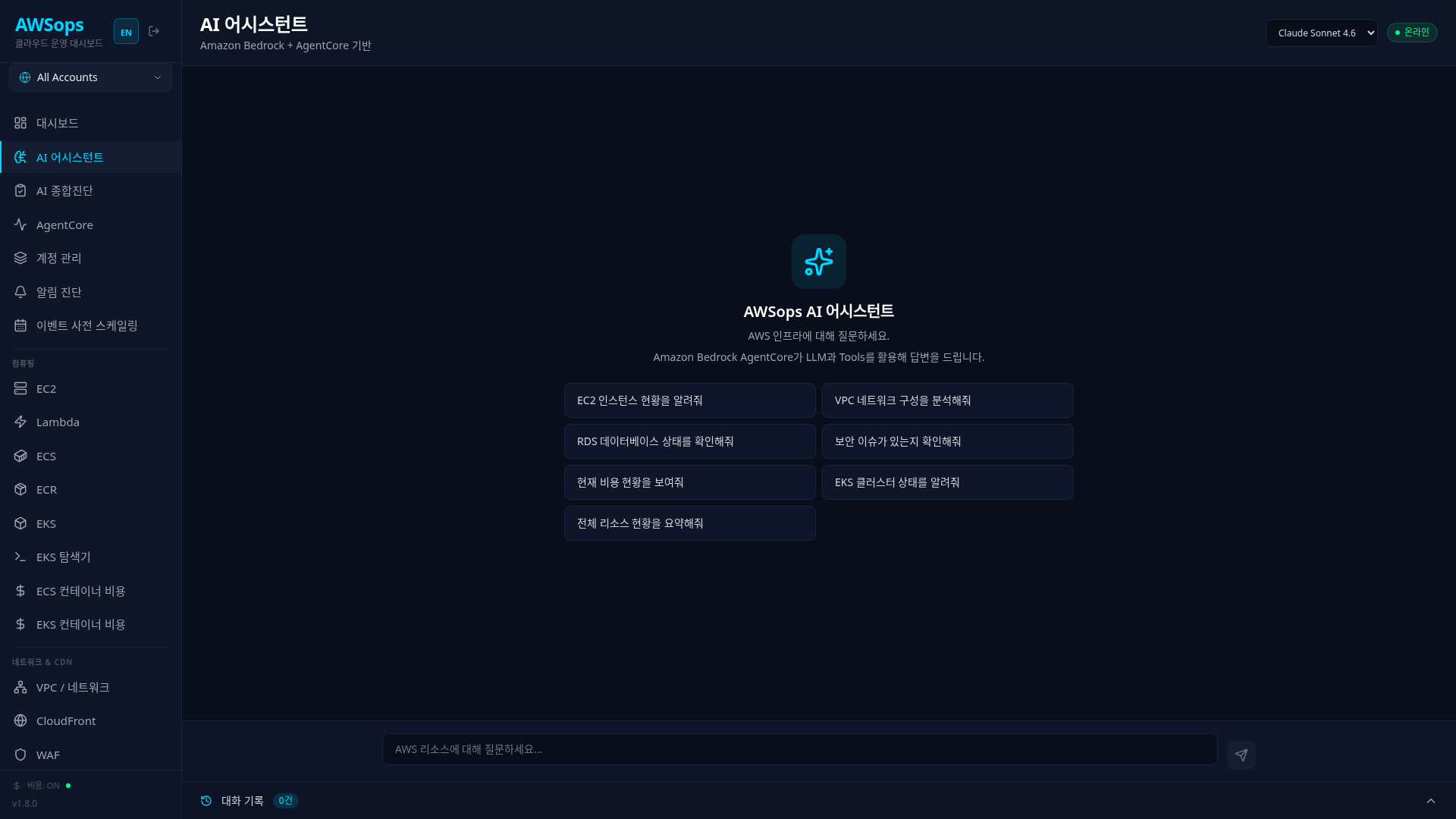
Architecture
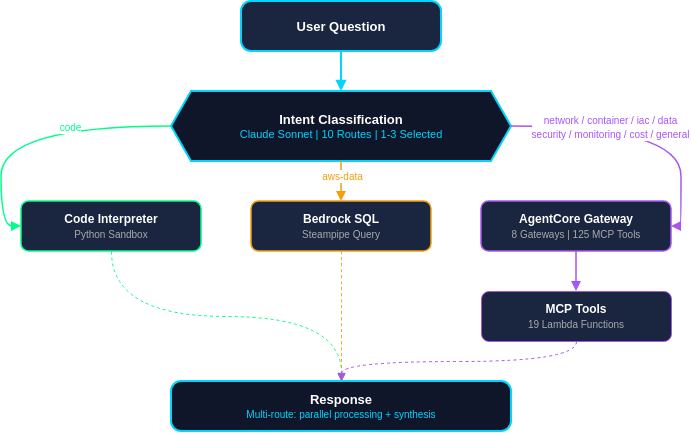
11-Route Classification
The AI Assistant analyzes questions and automatically routes them to the most appropriate destination.
Routing Table
| Priority | Route | Gateway | Tools | Description |
|---|---|---|---|---|
| 1 | code | - | - | Python code execution, calculations, visualization |
| 2 | network | Network | 17 | VPC, TGW, VPN, Flow Logs, Reachability |
| 3 | container | Container | 24 | EKS, ECS, Istio troubleshooting |
| 4 | iac | IaC | 12 | CDK, CloudFormation, Terraform |
| 5 | data | Data | 24 | DynamoDB, RDS, ElastiCache, MSK |
| 6 | security | Security | 14 | IAM, policy simulation, security summary |
| 7 | monitoring | Monitoring | 16 | CloudWatch, CloudTrail |
| 8 | cost | Cost | 9 | Cost analysis, forecasting, budgets |
| 9 | datasource | - | 7 DS | External observability (Prometheus/Loki/Tempo/ClickHouse/Jaeger/Dynatrace/Datadog) — natural language → query |
| 10 | aws-data | Ops | SQL | Resource lists/status (Steampipe SQL) |
| 11 | general | Ops | 9 | General AWS questions, documentation search |
Route Details
1. code - Code Interpreter
Used when Python code execution is required.
Example questions:
- "Visualize AWS cost data as a chart"
- "Calculate random number statistics"
- "Create code to parse JSON data"
2. network - Network Gateway
Used for VPC networking, Transit Gateway, VPN, and traffic analysis.
Key tools:
list_vpcs,get_vpc_network_details,describe_networklist_transit_gateways,get_tgw_routes,get_all_tgw_routeslist_vpn_connections,list_network_firewallsanalyze_reachability,query_flow_logs
Example questions:
- "Analyze TGW routes"
- "Diagnose VPN connection status"
- "Check if EC2 instances can communicate"
- "Query denied traffic from VPC Flow Logs"
3. container - Container Gateway
Used for EKS, ECS, and Istio service mesh troubleshooting.
Key tools:
list_eks_clusters,get_eks_vpc_config,get_eks_insightsecs_resource_management,ecs_troubleshooting_toolistio_overview,list_virtual_services,check_sidecar_injection
Example questions:
- "Diagnose EKS cluster status"
- "Check if ECS service is healthy"
- "Check Istio sidecar injection status"
4. iac - IaC Gateway
Used for Infrastructure as Code related tasks.
Key tools:
validate_cloudformation_template,check_cloudformation_template_compliancesearch_cdk_documentation,cdk_best_practicesSearchAwsProviderDocs,terraform_best_practices
Example questions:
- "Tell me CDK best practices"
- "Analyze CloudFormation stack error"
- "Search for Terraform VPC module"
5. data - Data Gateway
Used for AWS database and streaming services.
Key tools:
list_tables,describe_table,query_table,dynamodb_data_modelinglist_db_instances,describe_db_instance,execute_sqllist_cache_clusters,elasticache_best_practiceslist_clusters(MSK),msk_best_practices
Example questions:
- "Show DynamoDB table details"
- "Check RDS instance status"
- "Tell me ElastiCache best practices"
6. security - Security Gateway
Used for IAM and security-related analysis.
Key tools:
list_users,list_roles,list_policieslist_access_keys,simulate_principal_policyget_account_security_summary
Example questions:
- "Show IAM user list with Access Key status"
- "Simulate if this role can access S3"
- "Give me an account security summary"
7. monitoring - Monitoring Gateway
Used for CloudWatch and CloudTrail analysis.
Key tools:
get_metric_data,analyze_metric,get_active_alarmsdescribe_log_groups,execute_log_insights_querylookup_events,lake_query
Example questions:
- "Show EC2 CPU usage trends"
- "Query recent IAM events from CloudTrail"
- "Show active alarm list"
8. cost - Cost Gateway
Used for cost analysis and optimization.
Key tools:
get_cost_and_usage,get_cost_and_usage_comparisonsget_cost_forecast,get_pricinglist_budgets
Example questions:
- "Analyze this month's costs"
- "Compare costs by service"
- "Forecast next month's costs"
9. datasource - External observability (natural language → query)
Used for questions about connected external observability platforms (Prometheus/Loki/Tempo/ClickHouse/Jaeger/Dynatrace/Datadog).
How it works:
- Claude converts the natural-language question into the platform's query language (PromQL/LogQL/TraceQL/SQL)
- Runs the query against datasources that pass the SSRF allowlist
- Analyzes the result and responds
Example questions:
- "Show the 5xx trend for the payment service" (Prometheus)
- "Find error logs in the last hour" (Loki)
- "Analyze slow traces" (Tempo/Jaeger)
10. aws-data - Bedrock + Steampipe SQL
Used for resource lists, status, and count queries.
Processing flow:
- Claude Sonnet generates SQL from the question
- Query executes directly on Steampipe pg Pool
- Bedrock analyzes results and generates response
Example questions:
- "Show EC2 instance list"
- "Check how many S3 buckets we have"
- "Analyze VPC network configuration"
- "Summarize all resources"
11. general - Ops Gateway
Used for general AWS questions, documentation search, and best practices.
Key tools:
search_documentation,read_documentationrecommend,list_regions,get_regional_availability
Example questions:
- "Check if this service is available in Seoul region"
- "What's the difference between ECS and EKS?"
- "Recommend a serverless architecture"
Multi-Route
When a single question spans multiple domains, it's classified into up to 3 routes for parallel processing.
Examples:
"Analyze VPC security groups and costs"
→ ["network", "cost"]

"Do a security check and verify IAM users"
→ ["security"]
During multi-route processing, responses from each Gateway are synthesized into a single unified answer.
SSE Streaming
Responses are streamed via Server-Sent Events (SSE).
Progress Indicator
Analyzing question...
→ Calling Network Gateway...
→ Generating response...
Streaming Events
| Event | Description | Data |
|---|---|---|
status | Progress status messages | { step, message } |
chunk | Real-time text streaming | { delta: string } |
done | Complete response data | { content, route, usedTools, ... } |
error | Error messages | { message } |
Streaming Modes
Three streaming modes are automatically selected based on the response path:
| Mode | Applied Path | Method |
|---|---|---|
| Real Streaming | Multi-route synthesis | Bedrock Converse API — token-level immediate delivery |
| Simulated Streaming | Single Gateway response | 50-char chunks + 15ms delay — typing effect |
| Direct Streaming | aws-data (Steampipe+Bedrock) | Bedrock native streaming |
When synthesizing results from 2-3 parallel routes, the Bedrock Converse Stream API (ConverseStreamCommand) streams the synthesis process in real-time. Users can see the synthesized results as they are generated.
Tool Usage Display
MCP tools used are displayed at the bottom of the response.
Tools: list_vpcs, get_vpc_network_details, analyze_reachability
Queried: aws_vpc, aws_vpc_subnet, aws_vpc_security_group
Conversation History
Session Context
The current session's conversation is maintained, enabling follow-up questions.
User: "Show VPC list"
AI: (VPC list response)

User: "Tell me details about the default VPC from that list"
AI: (References previous context to provide default VPC details)
Saved History
Conversation history is saved per user and can be viewed in the panel at the bottom of the screen.
- Saved info: Question, response summary, route, response time, timestamp
- Retention period: 365 days
- Search: Search previous conversations by keyword
Session Statistics
Current session statistics are displayed at the bottom of the screen.
5 queries │ avg 3.2s │ 100% │ aws-data:3 security:1 network:1
- queries: Total question count
- avg: Average response time
- Success rate: Ratio of successful responses
- Route distribution: Call count by route
Related Question Suggestions
Related follow-up questions are suggested by route after each response.
| Route | Example Suggestions |
|---|---|
| security | "Show IAM user list with Access Key status" |
| network | "Show VPC subnets and route tables" |
| container | "Check EKS node CPU/memory usage" |
| cost | "Compare costs by service" |
Next Steps
- AgentCore Details - Gateway and tool details
- Dashboard - Return to dashboard