# 인증
Istio는 서비스 간 인증(Peer Authentication)과 최종 사용자 인증(Request Authentication)을 지원합니다.
## 목차
1. [인증 개요](#인증-개요)
2. [Request Authentication (JWT)](#request-authentication-jwt)
3. [OAuth/OIDC 통합](#oauthoidc-통합)
4. [실전 예제](#실전-예제)
5. [문제 해결](#문제-해결)
## 인증 개요
RequestAuthentication은 잘못된 JWT를 거부하지만 AuthorizationPolicy로 요구하지 않으면 자격 증명 없는 요청을 허용합니다. 토큰을 검증할 뿐 로그인·OAuth 리다이렉트·갱신·불투명 access token introspection을 수행하지 않습니다. 발급자의 discovery 문서에서 정확한 issuer/JWKS를 확인하고 대상 audience를 구성하세요. 예제는 default의 app=myapp HTTP 워크로드용 대안이며 그림의 Gateway에 적용하려면 게이트웨이를 대상으로 연결해야 합니다.
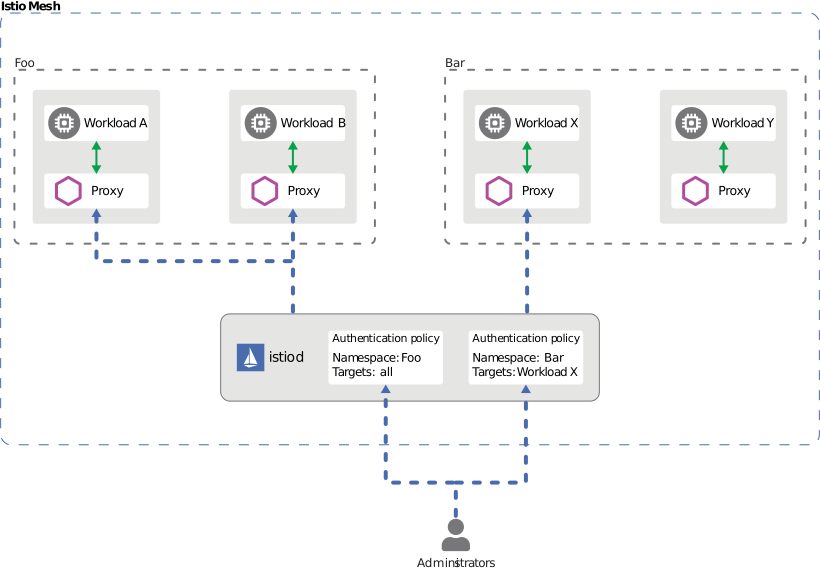
Istio는 두 가지 유형의 인증을 제공합니다:
1. **Peer Authentication (서비스 간 인증)**
- mTLS를 사용한 서비스 간 인증
- SPIFFE ID 기반 신원 확인
- PeerAuthentication CRD로 구성
2. **Request Authentication (최종 사용자 인증)**
- JWT 토큰 기반 사용자 인증
- OAuth/OIDC 제공자 통합
- RequestAuthentication CRD로 구성

[🔍 인터랙티브 다이어그램 보기](https://www.atomai.click/kubernetes-docs/archmaps/ko-service-mesh-istio-security-02-authentication-0.html)
## Request Authentication (JWT)
### 기본 JWT 검증
```yaml
apiVersion: security.istio.io/v1
kind: RequestAuthentication
metadata:
name: jwt-auth
namespace: default
spec:
selector:
matchLabels:
app: myapp
jwtRules:
- issuer: "https://accounts.google.com"
jwksUri: "https://www.googleapis.com/oauth2/v3/certs"
audiences: [""]
```
### 여러 Issuer 지원
```yaml
apiVersion: security.istio.io/v1
kind: RequestAuthentication
metadata:
name: multi-issuer-jwt
namespace: default
spec:
selector:
matchLabels:
app: myapp
jwtRules:
- issuer: "https://accounts.google.com"
jwksUri: "https://www.googleapis.com/oauth2/v3/certs"
audiences: [""]
- issuer: "https://login.microsoftonline.com/tenant-id/v2.0"
jwksUri: "https://login.microsoftonline.com/tenant-id/discovery/v2.0/keys"
audiences: [""]
```
### Custom Header
```yaml
apiVersion: security.istio.io/v1
kind: RequestAuthentication
metadata:
name: jwt-custom-header
namespace: default
spec:
selector:
matchLabels:
app: myapp
jwtRules:
- issuer: "https://auth.example.com"
jwksUri: "https://auth.example.com/.well-known/jwks.json"
audiences: ["my-api"]
fromHeaders:
- name: "x-auth-token"
prefix: "Bearer "
```
## OAuth/OIDC 통합
### AWS Cognito
```yaml
apiVersion: security.istio.io/v1
kind: RequestAuthentication
metadata:
name: cognito-jwt
namespace: default
spec:
selector:
matchLabels:
app: myapp
jwtRules:
- issuer: "https://cognito-idp.us-west-2.amazonaws.com/us-west-2_EXAMPLE"
jwksUri: "https://cognito-idp.us-west-2.amazonaws.com/us-west-2_EXAMPLE/.well-known/jwks.json"
```
Cognito API 접근은 token_use=access와 의도한 client_id를 검증하세요. ID token의 aud는 앱 클라이언트 ID이며 access token의 aud는 resource binding을 요청한 경우에만 있으므로 ID token의 audience 규칙을 그대로 복사하지 마세요. API별 scope/group 인가도 필요한 대로 추가하고 예시 풀/클라이언트 값을 교체하세요.
```yaml
apiVersion: security.istio.io/v1
kind: AuthorizationPolicy
metadata:
name: cognito-access-token
namespace: default
spec:
selector:
matchLabels:
app: myapp
action: ALLOW
rules:
- from:
- source:
requestPrincipals:
- "https://cognito-idp.us-west-2.amazonaws.com/us-west-2_EXAMPLE/*"
when:
- key: request.auth.claims[token_use]
values: ["access"]
- key: request.auth.claims[client_id]
values: [""]
```
### Keycloak
```yaml
apiVersion: security.istio.io/v1
kind: RequestAuthentication
metadata:
name: keycloak-jwt
namespace: default
spec:
selector:
matchLabels:
app: myapp
jwtRules:
- issuer: "https://keycloak.example.com/realms/myrealm"
jwksUri: "https://keycloak.example.com/realms/myrealm/protocol/openid-connect/certs"
audiences: ["my-api"]
```
현재 Keycloak 기본 경로에는 /auth가 없습니다. http-relative-path=/auth로 구성한 환경은 해당 경로를 포함한 실제 issuer를 사용해야 합니다.
### Auth0
```yaml
apiVersion: security.istio.io/v1
kind: RequestAuthentication
metadata:
name: auth0-jwt
namespace: default
spec:
selector:
matchLabels:
app: myapp
jwtRules:
- issuer: "https://your-tenant.auth0.com/"
jwksUri: "https://your-tenant.auth0.com/.well-known/jwks.json"
audiences:
- "https://your-api.example.com"
```
## 실전 예제
### JWT 검증 + Authorization
```yaml
# JWT 검증
apiVersion: security.istio.io/v1
kind: RequestAuthentication
metadata:
name: jwt-auth
namespace: default
spec:
selector:
matchLabels:
app: myapp
jwtRules:
- issuer: "https://auth.example.com"
jwksUri: "https://auth.example.com/.well-known/jwks.json"
audiences: ["my-api"]
---
# JWT 없으면 거부
apiVersion: security.istio.io/v1
kind: AuthorizationPolicy
metadata:
name: require-jwt
namespace: default
spec:
selector:
matchLabels:
app: myapp
action: ALLOW
rules:
- from:
- source:
requestPrincipals: ["*"]
```
## 문제 해결
### JWT 검증 실패
```bash
# 1. RequestAuthentication 확인
kubectl get requestauthentication -A
kubectl describe requestauthentication -n
# 2. JWT 토큰 디코드
python3 - <<'PYJWT'
import base64, getpass, json
segment = getpass.getpass("JWT (not echoed): ").split(".")[1]
claims = json.loads(base64.urlsafe_b64decode(segment + "=" * (-len(segment) % 4)))
print({k: claims.get(k) for k in ("iss", "aud", "exp", "nbf", "token_use", "client_id")})
PYJWT
# 3. JWKS 엔드포인트 확인
curl -fsS https://auth.example.com/.well-known/jwks.json
# 4. Envoy 로그 확인
kubectl logs -c istio-proxy -n | grep JWT
```
서명·issuer·audience·시간 검증 전의 디코딩 결과는 신뢰할 수 없습니다. 실제 토큰을 명령 기록이나 공개 디코더에 남기지 마세요. 로컬 JWT 검증이 발급자의 취소 상태를 자동 조회하지는 않습니다. 토큰 없음·만료·잘못된 issuer/audience·정상 토큰을 각각 테스트하세요. Ambient L7 인증은 워크로드 selector 대신 waypoint targetRefs를 사용합니다.
## 참고 자료
- [Istio Request Authentication](https://istio.io/latest/docs/reference/config/security/request_authentication/)
- [JWT Authentication](https://istio.io/latest/docs/tasks/security/authentication/authn-policy/)
- [Primary reference 1](https://istio.io/latest/docs/reference/config/security/request_authentication/)
- [Primary reference 2](https://istio.io/latest/docs/reference/config/security/authorization-policy/)
- [Primary reference 3](https://istio.io/latest/docs/reference/config/security/peer_authentication/)
- [Primary reference 4](https://docs.aws.amazon.com/cognito/latest/developerguide/amazon-cognito-user-pools-using-the-access-token.html)
- [Primary reference 5](https://docs.aws.amazon.com/cognito/latest/developerguide/amazon-cognito-user-pools-using-the-id-token.html)
- [Primary reference 6](https://www.keycloak.org/migration/migrating-to-quarkus)
- [Primary reference 7](https://www.keycloak.org/securing-apps/oidc-layers)