# Security
> **Reviewed Version**: Istio 1.31.0
> **Last Updated**: September 11, 2026
Istio provides robust security features within the service mesh. Based on the Zero Trust security model, it automatically encrypts service-to-service communication and provides fine-grained access control.
## Table of Contents
1. [Security Architecture Overview](#security-architecture-overview)
2. [Core Security Features](#core-security-features)
3. [Security Components](#security-components)
4. [Detailed Documentation](#next-steps)
5. [Security Best Practices](#security-best-practices)
6. [Security Monitoring](#3-security-monitoring)
## Security Architecture Overview
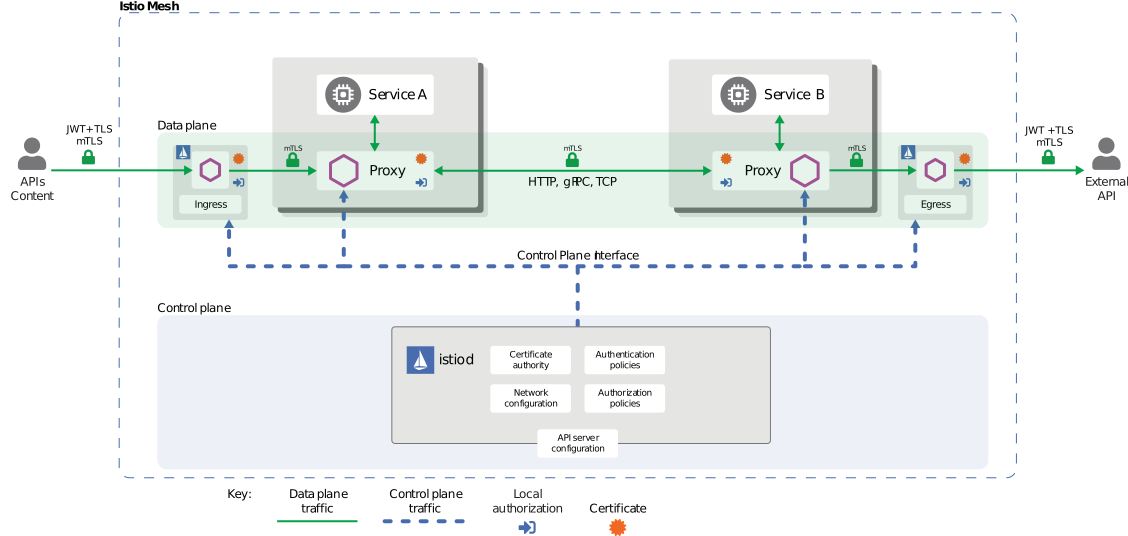
Istio implements a **Zero Trust security model** for enrolled mesh traffic. Traffic exclusions, plaintext clients, and unsupported protocols still need explicit controls. The following describes the main security responsibilities:
### Security Architecture Layers

[🔍 View interactive diagram](https://www.atomai.click/kubernetes-docs/archmaps/en-service-mesh-istio-security-readme-0.html)
### Security Components
1. **Control Plane (istiod)**
- Certificate Authority (CA): X.509 certificate issuance and management
- Configuration API: Security policy distribution and management
- Service Discovery: Workload identity management
2. **Data Plane (Envoy sidecars or ambient ztunnel/waypoints)**
- mTLS Termination Points: Encrypted communication between services
- Policy Enforcement: Authentication/authorization policy application
- Security Telemetry: Security metrics collection
3. **Identity Management**
- Strong identity management based on SPIFFE standard
- Integration with Kubernetes ServiceAccount
- Default certificate lifetime is 24 hours; rotation occurs before expiry
4. **Policy Engine**
- Declarative security policies (CRD-based)
- Fine-grained access control (RBAC)
- Audit logging support
## Core Security Features
Istio provides the following core security features:
### 1. Communication Security (mTLS)
Migrate enrolled workloads from PERMISSIVE to STRICT after verifying all required clients use mTLS.
Auto mTLS encrypts communication between enrolled mesh peers; PERMISSIVE also accepts plaintext. Use STRICT to require mesh mTLS on the selected inbound workloads.
```yaml
apiVersion: security.istio.io/v1
kind: PeerAuthentication
metadata:
name: default
namespace: istio-system
spec:
mtls:
mode: STRICT # Production: STRICT, Migration: PERMISSIVE
```
**Mode Descriptions**:
- **STRICT**: Only mTLS allowed (recommended for production)
- **PERMISSIVE**: Both mTLS and plaintext allowed (for migration)
- **DISABLE**: Disable Istio transport mTLS in sidecar mode; unsupported in ambient
The following policy examples use sidecar selectors. Ambient ztunnel enforces L4 security; JWT and other L7 policies require an appropriate waypoint and targetRefs attachment.
### 2. Authentication
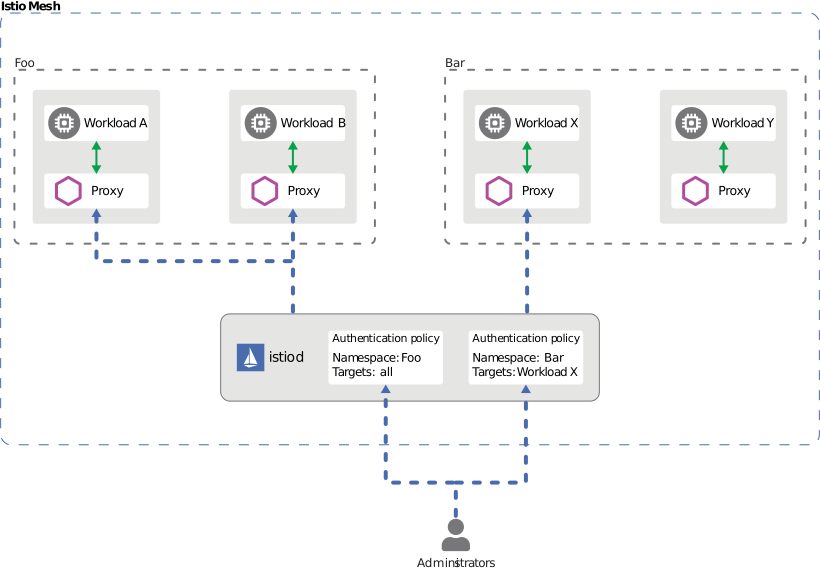
Istio provides two layers of authentication:
- **Peer Authentication**: Service-to-service authentication (mTLS + SPIFFE ID)
- **Request Authentication**: JWT verification for supported issuers; login/OAuth flows remain external
**Example**:
```yaml
# Request Authentication (JWT)
apiVersion: security.istio.io/v1
kind: RequestAuthentication
metadata:
name: jwt-auth
namespace: default
spec:
jwtRules:
- issuer: "https://accounts.google.com"
jwksUri: "https://www.googleapis.com/oauth2/v3/certs"
audiences: [""]
```
### 3. Authorization
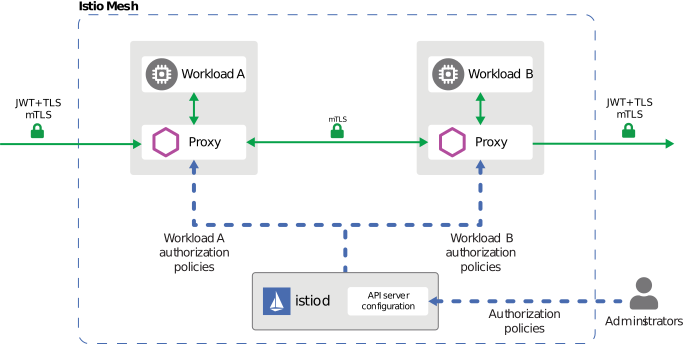
Fine-grained access control policies are applied. AuthorizationPolicy controls based on:
- Service Account / Namespace
- HTTP Method / Path
- IP Address
- JWT Claims
```yaml
apiVersion: security.istio.io/v1
kind: AuthorizationPolicy
metadata:
name: allow-read
spec:
action: ALLOW
rules:
- from:
- source:
principals: ["cluster.local/ns/default/sa/myapp"]
to:
- operation:
methods: ["GET"]
paths: ["/api/*"]
```
## Security Best Practices
### 1. Defense in Depth
Combine transport identity, verified request credentials, and explicit authorization rules.
Implement defense in depth by applying security at multiple layers:
**Network Layer**:
```yaml
# 1. Enable mTLS STRICT mode
apiVersion: security.istio.io/v1
kind: PeerAuthentication
metadata:
name: default
namespace: istio-system
spec:
mtls:
mode: STRICT
```
**Application Layer**:
```yaml
# 2. Enable JWT authentication
apiVersion: security.istio.io/v1
kind: RequestAuthentication
metadata:
name: require-jwt
namespace: default
spec:
jwtRules:
- issuer: "https://your-auth-provider.com"
jwksUri: "https://your-auth-provider.com/.well-known/jwks.json"
audiences: [""]
```
**Access Control Layer**:
```yaml
# 3. Default deny policy
apiVersion: security.istio.io/v1
kind: AuthorizationPolicy
metadata:
name: deny-all
namespace: default
spec:
action: ALLOW
rules: []
---
# 4. Allow only required access
apiVersion: security.istio.io/v1
kind: AuthorizationPolicy
metadata:
name: allow-specific
namespace: default
spec:
action: ALLOW
rules:
- from:
- source:
principals: ["cluster.local/ns/frontend/sa/webapp"]
requestPrincipals: ["*"]
to:
- operation:
methods: ["GET", "POST"]
```
RequestAuthentication alone accepts requests without a token. The ALLOW example above requires both the verified peer and a verified request principal; an empty ALLOW policy establishes default deny. A DENY-all rule would take precedence and block those exceptions. These namespace-wide examples affect every matching workload; scope selectors/targetRefs deliberately. AUDIT needs a configured audit implementation, and access logs must be enabled separately.
### 2. Principle of Least Privilege
- Grant only minimum required permissions to each service
- Separate ServiceAccounts granularly
- Utilize namespace isolation
### 3. Security Monitoring
- Enable Istio Access Logs
- Collect security metrics with Prometheus
- Monitor mTLS status with Kiali
## Next Steps
1. **[mTLS](https://www.atomai.click/kubernetes-docs/llms/en/service-mesh/istio/security/01-mtls.md)**: Service-to-service encryption and identity management
2. **[Authentication](https://www.atomai.click/kubernetes-docs/llms/en/service-mesh/istio/security/02-authentication.md)**: JWT and OAuth/OIDC integration
3. **[Authorization](https://www.atomai.click/kubernetes-docs/llms/en/service-mesh/istio/security/03-authorization.md)**: Fine-grained access control policies
## References
### Official Documentation
- [Istio Security Concepts](https://istio.io/latest/docs/concepts/security/)
- [Security Best Practices](https://istio.io/latest/docs/ops/best-practices/security/)
- [Security Reference](https://istio.io/latest/docs/reference/config/security/)
### Related Standards
- [SPIFFE Specification](https://github.com/spiffe/spiffe)
- [OAuth 2.0 / OIDC](https://oauth.net/2/)
- [JWT (RFC 7519)](https://datatracker.ietf.org/doc/html/rfc7519)
## Quiz
To test your knowledge from this chapter, try the [Istio Security Quiz](https://www.atomai.click/kubernetes-docs/en/quizzes/service-mesh/istio/security).